I’ve been running NixOS with Flakes as my daily driver for a while. The reproducibility is genuinely impressive — declare your system once, deploy it anywhere. But over time the cognitive overhead started to outweigh the benefits for a single-user setup. Every small config change requires understanding the Nix language, the module system, and whether something is managed by NixOS or Home Manager. I wanted something I could debug with basic Linux knowledge without reaching for the manual. ...
A Simplified Learning Workflow with Supernote and Obsidian
Most note-taking systems fail for the same reason: they optimise for capture, not comprehension. Highlights accumulate. Folders fill up. Nothing gets used. This workflow is an attempt to fix that. It uses a Supernote e-ink tablet as a thinking surface and Obsidian as a permanent knowledge layer. The goal is not to collect more information — it is to understand what you read and hear well enough to actually use it. ...
A Simple Reading and Learning Workflow with Supernote and Obsidian
Most note-taking systems fail for the same reason: they optimise for capture, not comprehension. Highlights accumulate. Folders fill up. Nothing gets used. This workflow is an attempt to fix that. It uses a Supernote e-ink tablet as a thinking surface and Obsidian as a permanent knowledge layer. The goal is not to collect more information — it is to understand what you read well enough to actually use it. One Principle Never copy. Always restate. ...
Stow vs Home Manager: Managing Dotfiles on NixOS (and Beyond)
I’ve used GNU Stow to manage dotfiles for a while. It’s simple, elegant, and gets out of your way. You organise configs into directories, run stow */, and symlinks appear in $HOME. Done. But once I committed to NixOS as my daily driver, Stow started feeling like the wrong tool for the job — an imperative shim bolted onto a system designed to never need one. This post covers what changed, why Home Manager replaced Stow in my workflow, and when Stow is still the better choice. ...
The Start of Home Manager Journey
One of the things I love most about NixOS is that once you get something working, it is reproducible everywhere. This post covers how I wired up Alacritty, tmux, and Zsh with Oh My Zsh into a single shared home-manager module that applies across all my machines. The setup All my machines share a home/modules/base.nix file that is imported into each host’s home-manager configuration. The goal was a terminal experience that: ...
Secure Synology With Tailscale
Securing Nextcloud on a Synology NAS with Tailscale Running Nextcloud at home is great — until you realise your login page is visible to the entire internet. Even with two-factor authentication, you’re relying on Nextcloud’s code being bulletproof, and it’s had its fair share of CVEs over the years. The fix? Put it behind Tailscale and make it completely invisible to the outside world. Here’s how I set it up on a Synology NAS running Nextcloud in Docker, accessible from GrapheneOS and NixOS machines — with HTTPS and zero port forwarding. ...
Migrating from WordPress to Hugo: A Complete Guide
After years of running my blog on WordPress, I finally made the switch to Hugo and GitHub Pages. The result? A blazingly fast, version-controlled blog that costs nothing to host. Here’s how I did it and what I learned along the way. Why I Made the Switch WordPress is powerful, but over time I found myself frustrated with: Performance issues: Even with caching plugins, my site felt sluggish Security concerns: Constant updates and vulnerability patches Hosting costs: Paying monthly for shared hosting Database complexity: Backing up and managing MySQL databases Plugin bloat: Each feature required another plugin Hugo offered a compelling alternative: static site generation, Git-based workflow, and free hosting on GitHub Pages. ...
Hugo Cheatsheet
Hugo Cheatsheet A quick reference for the most useful Hugo commands, flags, and tips. Core Commands Command Description hugo new site <directory> Create a new Hugo site in the specified directory. hugo new <section>/<filename>.md Add a new content file (e.g., hugo new posts/my-first-post.md). hugo server Run a local development server with live reload (defaults to http://localhost:1313). hugo server -D Include drafts (draft: true) when serving locally. hugo Build the site for production (outputs to public/). hugo -d <output-dir> Specify a custom output directory for the generated site. hugo --minify Minify HTML/CSS/JS during the build for smaller payloads. hugo --gc Run garbage collection to remove unused files from the cache. hugo version Show the installed Hugo version. hugo env Display environment variables (useful for debugging). Useful Flags & Options Flag Purpose -s, --source <path> Set the working directory (useful when running from outside the site root). -b, --baseURL <url> Override the site’s base URL (good for staging environments). -t, --theme <name> Force a specific theme (overrides the one set in config.toml). --cleanDestinationDir Delete everything inside the destination folder before building. --ignoreCache Skip the cache and reprocess all files (helps when you suspect stale data). --verbose Show detailed processing information (great for troubleshooting). --logLevel <level> Control log output (debug, info, warn, error). Content Management Tips Front Matter ...
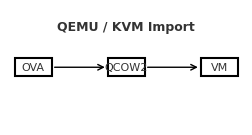
Import an OVA into QEMU/KVM
A reliable, step-by-step guide to bring a VirtualBox/VMware .ova into QEMU/KVM, with both GUI and CLI paths—and fixes for the most common pitfalls.Contents Prerequisites 1) Extract the OVA 2) Convert VMDK → QCOW2 3) Create the VM in virt-manager (GUI) 4) Alternative: virt-install (CLI) 5) Common gotchas & fixes Quick troubleshooting checklist Prerequisites QEMU/KVM, libvirt, and virt-manager installed on the host. User is allowed to manage libvirt (typically being in the libvirt/libvirtd and kvm groups). Enough disk space to hold the converted image (QCOW2). 1) Extract the OVA An OVA is a tar archive containing an .ovf (metadata) and one or more .vmdk disks. ...

Syncing Virtual Machines Over The Network with a NAS (SMB)
A simple, repeatable workflow for one VM image (Kali.qcow2), root-owned files, and an SMB share. Overview I run a Kali Linux virtual machine under QEMU/KVM and wanted to use the same VM across three different machines, while keeping a central backup on my NAS. The approach below keeps one master copy on the NAS and uses rsync to push updates from whichever host I used last and pull them on the next host. ...